Architecture
How Moly works under the hood
Moly has three packages: the CLI (@moly-mcp/lido), a web dashboard on Vercel, and these docs.
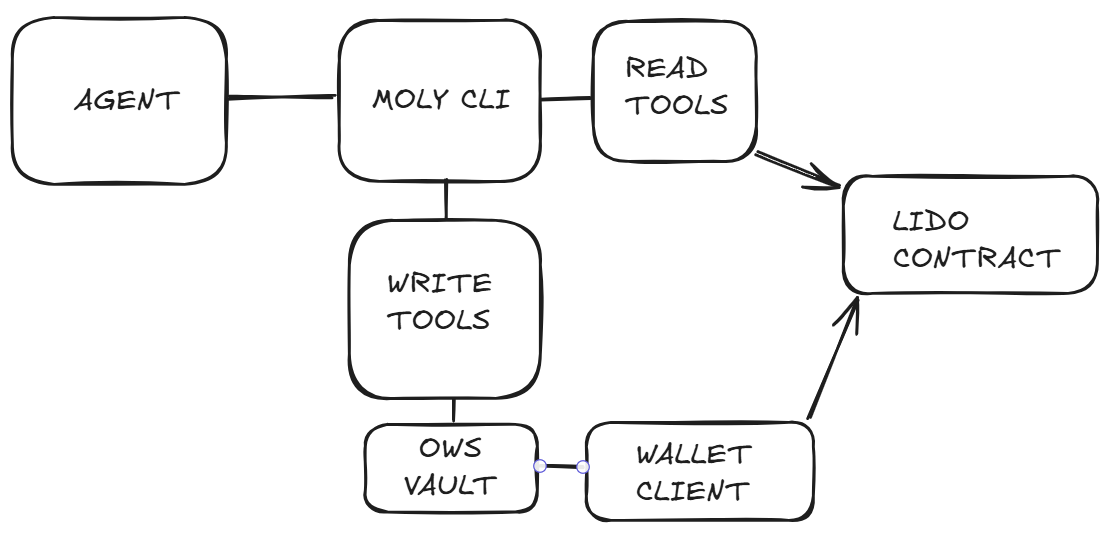
Request Flow (CLI MCP Server)
AI Agent                  Moly CLI (stdio)            Ethereum
  │                            │                            │
  │── MCP tool call ──────────►│                            │
  │                            │── eth_call (viem) ─────────►│
  │                            │◄── balance data ───────────│
  │◄── tool result ────────────│                            │
  │                            │                            │
Components
| Component | Purpose |
|---|---|
| CLI (npx @moly-mcp/lido) | 28 tools via stdio MCP server + interactive terminal |
| OWS Vault | Encrypted wallet storage via Open Wallet Standard |
| /api/chat | AI chat — Vercel AI SDK + OpenRouter |
| /api/skill | Agent skill document (raw markdown) |
| /docs | Documentation (this site) |
| /dashboard | Chat dashboard UI |
Stack
- Next.js — app framework, deployed on Vercel
- viem — raw Ethereum contract calls (no SDK dependencies)
- @modelcontextprotocol/sdk — MCP server with stdio transport
- Vercel AI SDK v6 — chat endpoint with tool calling
- OpenRouter — LLM gateway for the dashboard chat
How Tools Work
All tools use raw viem contract calls against Lido's deployed contracts. Read tools call eth_call directly. Write tools in simulation mode return gas estimates and expected outputs. In live mode with a configured wallet (OWS or raw key), write tools broadcast real transactions.
Configuration (mode, network, wallet) is stored in ~/.moly/config.json and can be changed via the setup wizard or the update_settings tool mid-session.